
Site
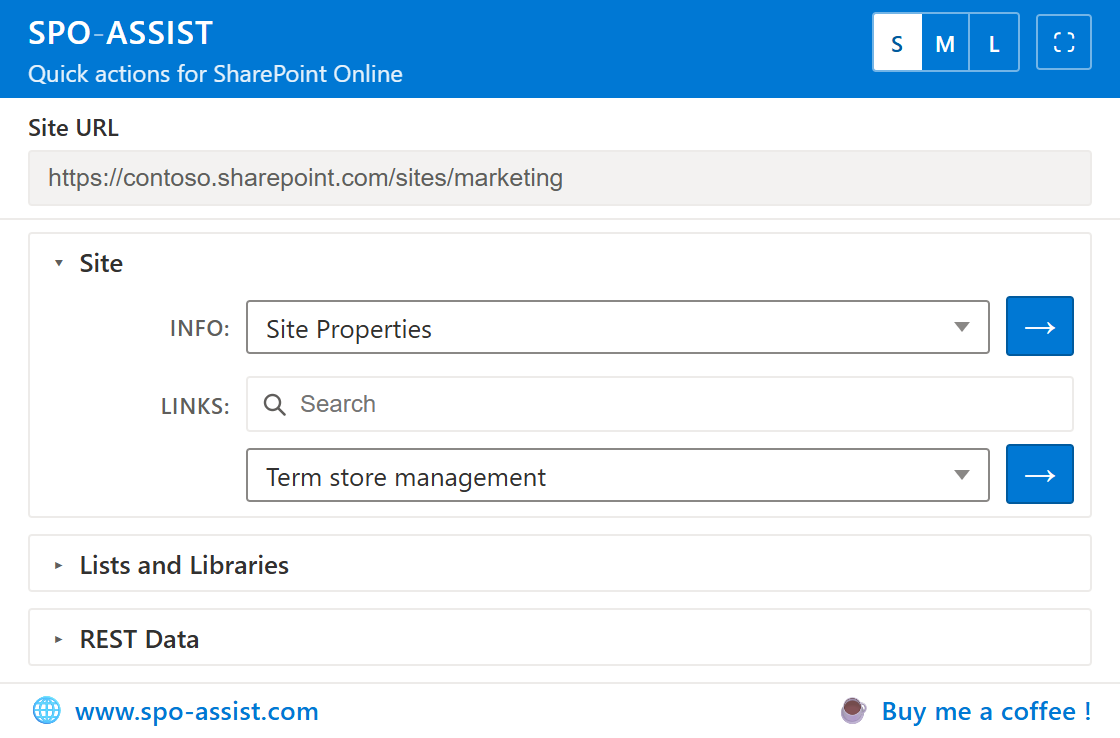
Inspect the current site, or jump straight into classic Site Settings.
- Who has Access
- Site Properties, Users & Groups
- Site Columns & Content Types
- Apps, Recycle Bin, Features
- Custom Actions
- Site Settings deep-links
Google Chrome extension for SharePoint Online—Site, List, and REST tools in a popup.
View field names, permissions, content types, settings, and build REST queries (and much MUCH more) without leaving the page.
Stay on your SharePoint Online site. SPO-Assist uses your open tab session—no separate sign-in.
Any SPO site or list. Keep one tab open on the target tenant.
Open the Google Chrome Extension. Site URL auto-fills, and you can pick a list or library when you need list scope.
Run an info action, open a settings deep-link, or query a REST endpoint.
Calls to SharePoint will use the permissions for the currently logged on user.
A short look at how SPO-Assist fits into everyday SharePoint Online admin work.
Inspect the current site, or jump straight into classic Site Settings.
Work on the selected list or library—fields, views, types, and settings.
Search common SharePoint REST GETs, run them, or check the capability matrix.
Open SPO-Assist in its own browser tab instead of the popup.
Resize it with S / M / L width presets to fit your screen.
See each field’s internal name right on the page—no more guessing at REST or CAML syntax.
Works on List Settings columns and on Site Columns.
SPO-Assist is free for Chromium-based browsers that support extensions.
Install SPO-Assist from the official Google Chrome Web Store listing.
Chrome Web StoreSign in to Google and leave a ⭐⭐⭐⭐⭐ review — it really helps.
If you know a colleague who’d benefit from SPO-Assist, feel free to pass it along. It’s recommendations like these that help SPO-Assist reach new users.
SPO-Assist is built and maintained in personal development time.
Hosting for this site and the Chrome listing also has ongoing costs.
If the extension saves you time, a small tip helps cover that — and maybe a few coffees.
Support meQuestions, bugs, or feature ideas—reach out.
For how SPO-Assist handles data, see the privacy policy.
Founder and Senior Technical Consultant at Kachihro
SharePoint expert for over 20 years—helping organisations design, build, and run Microsoft 365 solutions.
Another free Chrome extension from the same team, for the rest of the Microsoft 365 stack.

The free Microsoft 365 app launcher for Chrome
A free Chrome extension that gives you a quick launcher for jumping between Microsoft 365 apps and sites—built by the same team as SPO-Assist.
waffle-assist.com